SurveyMonkey
How to Buy Industry Benchmarks
Benchmarks give context to your survey results by allowing you to compare your results to others who used the same Question Bank questions as you. You can buy benchmarks for specific comparison groups to help you narrow down the types of organizations included in a benchmark, like country, organization size, or industry.
Claiming Your Free Industry Benchmark
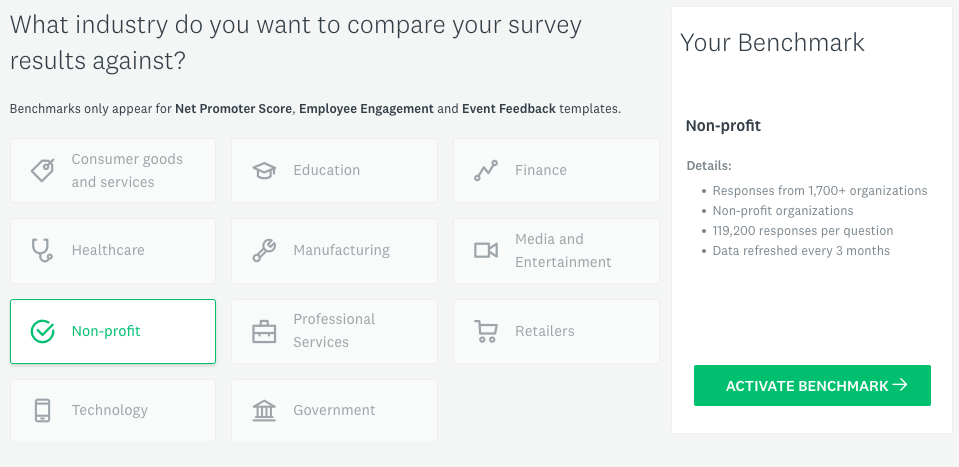
Every SurveyMonkey customer has access to free Global Benchmarks. But with an Advantage, Premier, or Enterprise plan, you and everyone in your team also gets one paid Industry Benchmark for free!
To claim your free benchmark:
- Log in to your SurveyMonkey account.
- Go to this Benchmarks Activation page to pick your industry.
- Click Activate Benchmark to seal the deal.
- Click View Benchmark. Now you can compare your survey results to other companies like yours!
Benchmarks are only available in English right now, so you'll need to switch your account language to English to claim your free benchmark.
Managing Your Benchmarks

My Benchmarks
You need to have at least one paid benchmark in your account to see My Benchmarks data.
To get to My Benchmarks:
- Log in to your SurveyMonkey account.
- Click your username in the upper-right corner to get to My Benchmarks.
Important Terms
The My Benchmarks page organizes your benchmarks by question set, comparison group, and benchmark surveys.
- Question Set: The group of questions you purchased. The name of the question set appears in the dark grey header—like Event Feedback, Net Promoter® Score, or Employee Engagement.
- Comparison Group: are the different attributes (country, industry, organization size, etc.) you chose for the benchmark—like Healthcare Companies or Architecture, Advertising, and Design.
- Benchmark Surveys: Underneath each comparison group, you'll find your benchmark surveys—any surveys where you're using at least one of the questions in the question set.
Viewing Questions & Benchmarks
On the My Benchmarks page, you'll see the following buttons:
- View Questions: See what's included in the question set you purchased. You can add any of these questions to any survey in your account using Question Bank, then view benchmarks in the Analyze Results section of the survey.
- View Benchmark: See a preview of what the Analyze Results section of a survey would look like. When you click this button, we create a blank survey for you from a template that includes the question set you purchased, plus additional non-benchmarkable questions so you can get a better idea of what a complete survey might look like. The survey title starts with "Benchmarks Preview" so you can easily identify it in your account and view benchmarks at any time.
- Create Survey: Create a survey in seconds using the questions you purchased. When you click this button, we create a blank survey for you from a template that includes the question set you purchased, plus additional non-benchmarkable questions. In the Design Survey section of the survey, feel free to delete questions you don't want to use in the survey, or add your own questions.
- Download Data: Download a CSV of benchmark data.
Buying More Benchmarks

How to Buy
To browse and buy benchmarks:
- Go to the Benchmarks Store.
- Choose a question set at the top of the page to get started—like Event Feedback, Net Promoter® Score, or Employee Engagement.
- Click View all questions to see the benchmarkable questions that'd be included in your purchase.
- Browse the available comparison groups. When you find one you're interested in, click + Add to Cart.
- When you're ready to continue, click Cart in the upper-right corner, then Review Order.
- Fill out your info and click Submit Your Order.
Availability
At this time, the Benchmarks Store is available in English and USD only. To pay in another currency, please visit the store and contact us.
Benchmark data is only available for certain Question Bank questions. If you're looking for a question set or comparison group that isn't listed or have additional questions, you can contact us in the upper-right corner of the Benchmarks Store.
Subscription & Pricing
Paid benchmarks are an annual subscription separate from your SurveyMonkey plan subscription. Prices for benchmarks vary depending on the question set and comparison groups you choose. Costs tends to increase for more specific comparisons since the data is harder to obtain. Browse the Benchmarks Store to see our current pricing.
Common Questions
- When can I see my paid benchmarks?
- Do I have to use every question in my survey?
- Can I edit benchmarkable questions?
- How often is benchmark data refreshed?
- Can I view benchmarks for any survey?
- Can people in my team see my benchmarks?