GetFeedback
Smart Forms
Build smarter forms and lighten the load on your users by hiding fields that are filled in with merge field data. In an app.getfeedback.com form question, you can choose to show all information that comes in or hide information that you’ve already collected from a respondent. For example, if you're sending to a group of 20 people but know that you already have a phone number for most of them, you can hide this field from most respondents and only show it to users who have not yet provided that information.
Before You Start
The merge field format depends on the program you send your survey from. If you send your survey from GetFeedback, we'll automatically create the link and merge fields for you. If you're using another email provider, the format may look different. Here is a list of common merge field syntax.
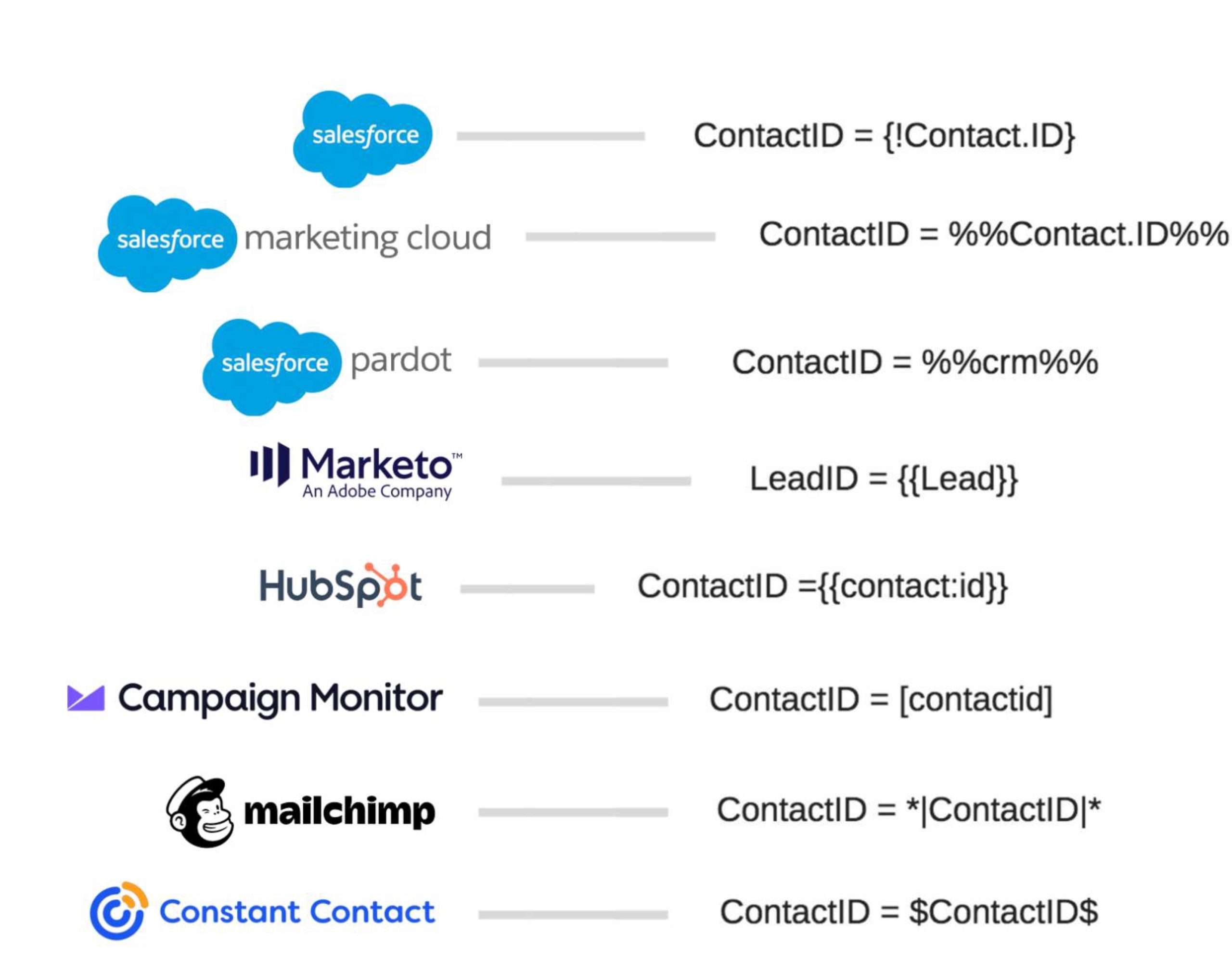
Prepopulating Form Fields
To automatically fill fields in a form:
- Create a form question in your survey.
- When creating your form, match the form field names to your merge fields. For example, if you view the form below you'll see in our URL our merge fields will be named: Name and Email. The URL for our survey (using Campaign Monitor syntax as an example) will look something like this: www.getfeedback.com/r/xxxxxxxx?Name=[name]&#mail-[email]
- If you’re bringing in date information from Salesforce to display on a form, format the Salesforce field as YYYY-MM-DD.
- Toggle on to Hide/fill with merge fields next to each field you want to prepopulate. These fields will be filled with merge fields if available. If no data is available, we’ll show these fields to the respondents so they can fill out the form.
- In the right side panel, select Copy Pre-populate Link to copy the survey link.
- Replace the components in angled brackets < > (for example: gf_q[4634119][9877578]=<Phone Number>) with merge fields using the syntax for your email provider.
If you're using Salesforce, your link may look like this:- https://getfeedback.com/r/ZgD21miF&gf_q[4634119][9877020]={!Contact.Name}&gf_q[4634119][9877578]={!Contact.HomePhone}&gf_q[4634119][9877579]={!Contact.Email}&gf_q[4634119][9877580]={!Contact.MailingState}&gf_q[4634119][9877581]={!Contact.MailingCountry}
When you send the survey link from your email service provider, we populate the form fields based on the data you have on file for your respondent.
Prepopulating Web Form Fields with JavaScript Variables
In GetFeedback for Web passive feedback forms, you can pre-fill your forms dynamically to make it easier for your customers to leave feedback and provide more transparency around the information that you collect. For example, you can pre-fill a customer's booking ID or email address if you have this information available.
You can pre-fill the following field types:
- Text fields
- Email fields
To pre-fill web form fields:
- Add an email or text field to your web feedback form. Take note of the name you use for these fields.
- In your website code for GetFeedback, add custom variables that have the same value as the field name.
Example: window.usabilla_live('data',{custom:{your_booking_id: 12345678},email:"sophie@usabilla.com"});
After including the data, we pre-fill the form with the data pulled in from your custom variables. Your respondents will be able to change the value if desired.